What changed in Jumuah, newest first. Every update is also announced on the support server. Join the support server
Dashboard: search in long lists and fixed help texts
The radio’s 177 stations and the time zones can now be picked by typing a few letters, with the keyboard or the mouse. On the Appearance page, the help for prayer-reminder messages showed a technical name instead of the text: this is fixed.
Faster images, lighter on memory
The bot’s images (prayer times, calendar, leaderboards, zakat…) kept nearly 4 MB in memory each time they were drawn: a burst could overload the bot. This is fixed: a burst of 300 images now takes 5 seconds instead of 13 and memory stays stable. The Status page also answers faster, and the Premium page now has structured data for Google.
Radio: paused if permissions are missing for 14 days
Like the other posts, the radio stops retrying when a voice-channel permission has been missing for 14 days (the owner is notified, settings are kept). /radio start brings it back in one click. Outdated buttons in /wird and /tracker no longer show “interaction failed”.
Premium free trial: 7 days
The free trial goes from 24 hours to 7 days, no card needed, with a reminder 24 hours before it ends. For subscriptions, Jumuah now DMs you if a payment fails, and a refund or a dispute stops the subscription concerned.
Full audit: stronger reliability and fixes
Daily posts are retried after a temporary Discord outage, and an outage of an outside service (Aladhan, jsDelivr) no longer delays other posts. /zakat no longer announces an amount as “due” without the gold price, very long hadiths display correctly, /wird keeps your reminder when you change the number of pages, and /my-data is always available.
Prayer times: a button to set your city
With no known city, /prayers and /qibla now reply privately with a “Set my city” button: type your city once, it is remembered and the times appear. The Arabic text of the supplications no longer shows stray double parentheses, and /help lists the 6 languages and the latest news.
Activity: adjust the volume or mute
Shared reading now has a volume slider and a mute button, personal to each participant and remembered between sessions. On iPhone only the button is shown: the volume is set with the device’s buttons.
The free Premium trial is offered where you work
On your server’s dashboard home, a card explains what Premium brings and starts the free trial in one click (24 h, no card). The button is also in /help for servers that have not tried yet.
More stable radio, and modules paused when permissions stay missing too long
The radio now starts with the more reliable stream server and remembers, station by station, the one that works: far fewer cuts of a few seconds. If a module cannot post because of missing permissions for 14 days, it is paused (settings kept) with a last message to the owner, and resumes by itself as soon as the permissions are fixed.
Permissions check: /config diagnostic and more reliable alerts
/config diagnostic checks that Jumuah can post and speak in every channel you set up, and that the roles it gives sit below its own, showing what is missing and how to fix it. A daily check warns before the first failed post. If the owner’s DMs are closed, the alert is posted in a server channel, and voice radio and adhan are covered too.
The site now showcases the Activity and the new cards
The home page now shows the bot’s real images (times, calendar, leaderboards, tracker, Ramadan, hifz, zakat) in a Discord window, plus an animated demo of the shared-reading Activity: word highlighting, speed, repetition and the reading circle. The Activity also has its own page.
Zakat and hifz progress as images
/zakat shows the amount due in large type with the calculation breakdown. /hifz progress shows a mosaic of the surah: one tile per verse, brighter as you learn it, gold once mastered.
Leaderboards, prayer tracker and Ramadan as images
The quiz, tasbih and attendance leaderboards now show a podium with avatars. /tracker shows a 30-day grid and the day’s ring; /ramadan shows the countdown in big numbers, then the 30-day crown with imsak and iftar.
Prayer times as an image
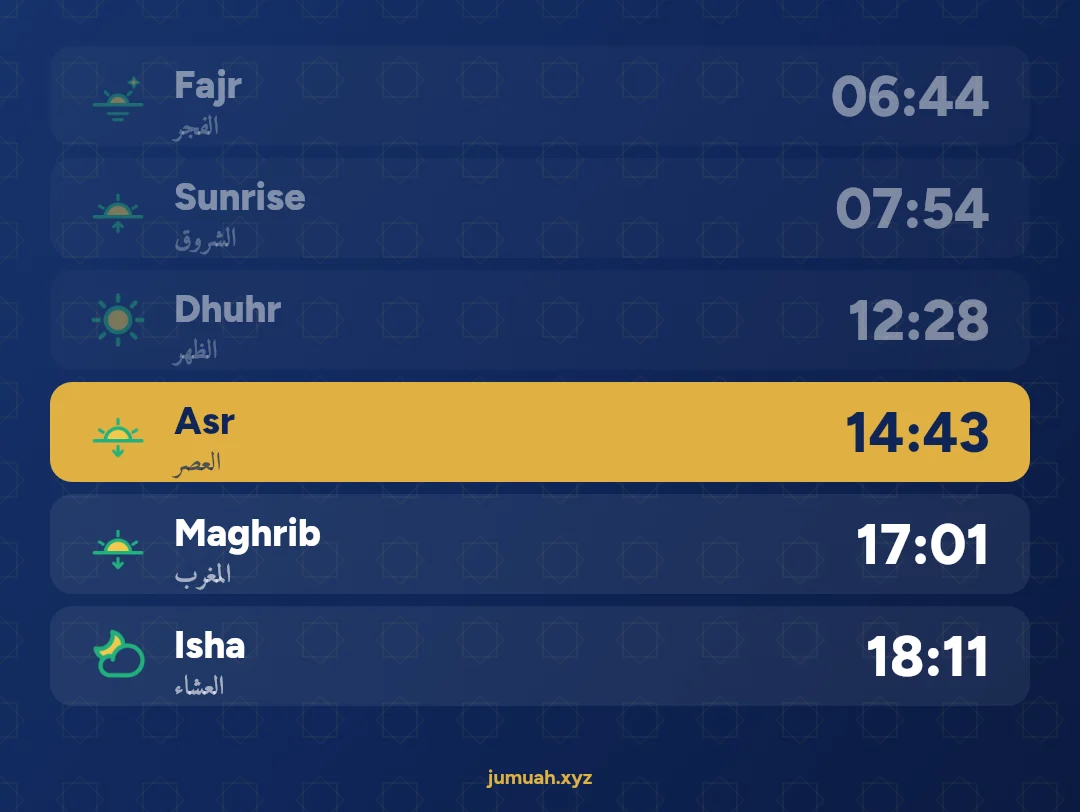
/prayers now shows the day’s six times as an image: one row per prayer with its icon, the next prayer in gold and past prayers faded. The countdown and the Yesterday / Tomorrow navigation stay under the image.
The Hijri calendar is now a real image
/calendar now shows the Hijri month as a grid: Hijri day in large type, Gregorian day small, today in gold, Fridays tinted, white days circled and events marked. Buttons move to the previous or next month.
Try Premium right from Discord
The free trial now starts in one click from Discord: at the end of the /config setup wizard, in /config view and when a recitation is Premium-only. For members who manage the server, no card needed.
Commands in Indonesian in Discord
If your Discord is set to Indonesian, Jumuah’s command list now shows the descriptions of every command and option in your language.
Prayer times: Yesterday, Tomorrow and Qibla in one tap
Under /prieres, three buttons move you from one day to another (Yesterday, Today, Tomorrow) without retyping the city or settings, and a fourth shows the Qibla direction from the same city.
Shared reading: circle on one line, the word reached stays marked when paused
The reading circle now takes a single line: whose turn it is, and the button you need right now (Start the circle, Pass the turn, Ask for a turn). An arrow unfolds the rest: turn size, stop, session, participants. On phones it starts folded, on large screens it stays open. And when you pause the recitation, the word reached and the words already read stay marked: you see where you stopped without restarting.
Shared reading on phones: the header is no longer hidden, clearer lists
On phones, Discord’s own bar (activity name, “Leave”) covered the top of the Activity: the surah title, the display button and the participant list were hidden beneath it. The header now sits below it. The three lists at the bottom (surah, translation, reciter) each have an icon and a name, and some room underneath so they no longer touch the screen edge.
Premium: owners and trials get the Activity everywhere, faster to open
If you own a Premium server (even one paid for by someone else or given for free), or you started a free trial that is still running, shared Quran reading is fully available to you in any voice channel, including on a free server or in a private call. Until now, only people who paid the subscription or boosted the support server got this. The Activity also opens faster: the content is prepared while Discord responds.
Shared reading: repeat a verse, change the speed, resume from a word
Three tools for learning and memorising in the Activity. Repeat each verse (×2, ×3, ×5 or ×10): the choice is shared, everyone hears the same thing. Playback speed (0.75×, 1×, 1.25× or 1.5×): personal, it does not change what others hear. Click a word in the verse being recited: the recitation resumes from that word, for you only (Mishary Al-Afasy, Al-Husary, Al-Minshawi and Ash-Shaatree).
Shared reading: the recited word lights up live, in time with the audio
In the Activity, the recitation is no longer underlined verse by verse: the word being recited lights up the moment it is spoken, fills as the word goes on, and the words already read stay marked. It works on the mushaf page and in continuous text (phones), with Mishary Al-Afasy, Al-Husary, Al-Minshawi and Abu Bakr Ash-Shaatree, thanks to the timings measured by Quran.com. With Maher Al-Muaiqly, the whole verse stays highlighted. The fill inside a word follows its duration: it is not measured letter by letter.
Premium statistics rebuilt: comparison, growth and most used commands
The dashboard Statistics page now covers 7, 30 or 90 days, with the change from the previous period, the member curve (joins, leaves, net growth), the most used commands, activity by day of the week, a 7-day average and a CSV export. Days without records are flagged instead of counted as zero. Member count and per-command tracking start today, so the curves fill in day by day.
Shared reading: a real mushaf page, your wird built in and resume your page
The Activity now shows the Madinah mushaf page on its 15 lines, like on paper, with the followed verse highlighted (on phones, the continuous text stays easier to read). If you have a wird (/wird), your daily portion appears at the top with an “I read it” button that records your streak without leaving the Activity. Your last page is offered when you reopen it, and the reading circle shows a recap of the verses each person read.
Shared reading: adjustable text, themes, page jump and a “Read together” button
In the Quran reading Activity, everyone can now adjust the text size and pick a theme (night, sepia or light), and go to a page by typing its number or with the keyboard arrows. The page, verse, translation and reciter are also restored after an update. And the bot’s live recitation card has a “Read together” button that opens the Activity in one click.
Your data is yours: /my-data export and /my-data delete
Two new commands to stay in control of what Jumuah keeps about you: /my-data export sends you a file with everything (settings, streaks, quiz, ticked prayers, sign-ups), visible only to you; /my-data delete erases it all, on every server, after a confirmation.
Premium: the reading circle, in turns like at the mosque
In the Quran reading Activity, Premium servers can start a reading circle: each person reads a chosen number of verses in turn (3, 5, 7, 10 or 20), then hands over to the next, who continues exactly where the previous one stopped. Everyone sees who is reading, who is waiting and which page each participant is on, can ask for a turn or follow the reader in one click. If the reader leaves, the next person takes over.
New: read the Quran together, live, in a voice channel
In a voice channel, click the Activities icon then Jumuah: everyone sees the same mushaf page at the same verse. One person turns the page, picks a surah or a translation (French, English, Turkish, Indonesian, Urdu), and it follows for every participant. Free for everyone, with a preview of Al-Fatiha’s recitation; the full verse-by-verse recitation and the choice of reciter are for Premium servers.
Linked roles: your consistency on your Discord profile
Connect your profile at jumuah.xyz/linked-roles: your prayer streak, Quran reading streak, khatm and votes show on your Discord profile, and server managers can use them as role requirements (e.g. prayer streak ≥ 30).
A more precise Status page: one bar per minute
Every service has its own line: Discord, API, website, database, image generation, scheduler, radio, backup and sources. One bar per minute over the last hour, with the time, status and response time on hover, and bot updates in purple.
Live message editor
Arrival, farewell, boost and ban messages are drawn as you type, exactly as Discord will show them. Click a text on the card or the embed to edit it in place; settings are sorted into three tabs.
A richer jumuah.xyz link in Discord
When you share jumuah.xyz in Discord, the preview shows the logo, the server count and buttons to add the bot, open the dashboard, see the commands or Premium.
Redesigned sign-in and server picker
Discord opens in a small window and you come back to the site, signed in. The server picker has a search and the site’s look. In Settings, a switch removes your server from the homepage band.
Account menu and new mobile menu
On the site, once signed in, your avatar opens a menu: what’s new, your servers, Premium, language and log out. On phones, the ☰ menu sorts pages into chips and sections.
Edit the bot’s profile right in its preview
In Appearance, Jumuah’s profile on your server looks just like in Discord: click the banner or avatar to change them, and the name and bio update live.
24-hour Premium trial and a new Premium page
The free Premium trial now lasts 24 hours, no card needed. Jumuah sends you a DM when it starts, 3 hours before it ends and when it ends, and the dashboard bell shows it too. The jumuah.xyz/premium page has been redone: monthly or yearly, both plans side by side and a table to compare everything.
A page for every feature
On jumuah.xyz, every feature now has its own page: what it looks like in Discord, how to turn it on and the related commands. They are all gathered on jumuah.xyz/fonctions.
Detailed status page
jumuah.xyz/statut now shows services by category, Discord gateways (shards), bot activity (radio, cards, today’s posts) and the system, refreshed every minute.
Mosque screen: full-screen iqama, announcements and hadith of the day
Between the adhan and the iqama, the screen shows a large countdown, then “Prayer in progress” for ten minutes. Up to 5 announcements rotate at the bottom, and a short authentic hadith changes every day.
Ban message
Like arrival and departure: a public message when a member is banned, card or embed, with the reason ({reason}). Member welcome › Ban.
Dashboard: notifications and unsaved changes
A bell shows server problems and what’s new. A bar reminds you of settings not yet saved and asks before leaving the page. The quiz is now also in Indonesian and Urdu.
Safer automatic roles
The arrival role and reward roles are re-checked on every assignment: if they have since received moderation or administration rights, Jumuah no longer gives them.
New menu: switch server and search
At the top of the menu, a selector switches between servers while staying on the same page. Below it, search (Ctrl+K) opens any setting in a few letters. Categories can be collapsed, and Community now has one page per tool.
Arrival, departure and boost: full editor
Each message has its own page: Jumuah card or message with an embed (colour, author, title, fields, thumbnail, footer, date) and a live Discord preview. The image is set separately: layout (classic, text only, left, right), gallery, solid or your own background, coloured overlay, ring and text colours, a “Surprise me” button, and its position in the message.
Dashboard organised into sub-categories
Posts, Prayers and Ramadan and Member welcome now show a list: each setting (arrival, departure, boost, hadith of the day, iqama, mosque screen…) has its own page, with its status at a glance. The menu expands the sub-categories, and the dashboard uses the full width of large screens.
Muslim server directory and verification button
List your server on jumuah.xyz/serveurs (Settings → Server directory) so other Muslims can find it. And a “Request my verification” button notifies your team, who verify the member in one click (Verification page).
Free Premium trial and yearly plan
Every server can try all of Premium for 7 days, no card needed, from the dashboard’s Subscription page. And Premium now comes yearly too: €29.99, 2 months free.
Mosque screen for the TV
A full-screen page for the prayer room: clock, Hijri date, times and iqama, a countdown to the next prayer, the Friday khutbah and your message. Free by city from the Prayer times page, with your mosque’s settings in Premium.
Full Ramadan: tarawih, Laylat al-Qadr, Zakat al-Fitr and Eid
Tarawih in voice with one juz a night (the whole Quran over the month), odd-night reminders with the Laylat al-Qadr supplication, Zakat al-Fitr before Eid, and an Eid message with takbir, card and the month in numbers. In Prayers and Ramadan (Premium).
Even more customisable welcome cards
Choose the greeting, a frame, the avatar ring, a black-and-white avatar on leave, auto-delete and mentions. With Premium: a style and background per card, calligraphy font, text colours, background blur and random message variants.
Jumuah in Indonesian and Urdu
The bot and the website now speak six languages. Indonesian follows your Discord language, Urdu is chosen with /language. Quran (Kemenag, Jalandhry), hadiths and tafsir in these languages.
Customisable welcome cards
Pick the background (5 Islamic backgrounds, or your own image with Premium), overlay, colour, avatar shape and layout, with a live preview. New: a message when a member leaves, an image for boosts and a “Send a test” button.
Welcoming new members
An image welcome card with the member’s avatar, a direct message and a role given on arrival. Also: a public thank-you for boosters, reward roles for prayer streaks and khatm, and joins and leaves in the statistics. Everything is set in the dashboard’s new “Member welcome” page.
Thank you to support server boosters
As soon as you boost the Jumuah server, the bot thanks you by DM and explains how to turn on your free Premium.
Ramadan: calendar image and one-click setup
The “Month calendar” button in /ramadan creates an image of the whole month (imsak, fajr, iftar, isha) for your city, also on the site’s Prayer times page. On the dashboard, “Ramadan in one click” sets up the khatm, events, reminders and counters at once.
Scheduled messages (Premium)
Write your own announcements (Friday collection, event reminder…) and choose the days and time: the bot posts them on its own. Up to 10 messages, with a preview on the dashboard.
Alerts when the bot can no longer post
Deleted channel, removed permission: the server owner is told by DM, and a “Fix” banner appears on the dashboard.
Consistency leaderboard in /tracker
The server’s full-prayer streaks, to motivate each other. Only those who choose to appear are listed.
Prayer times on your mosque’s website
A short code to copy from the Prayer times page shows today’s times on any website, in light or dark.
Free Premium for boosters
Boost the Jumuah support server and turn on Premium for the server of your choice, as long as you boost. Voters also get the “Soutien top.gg” role and badges on /profile.
Everything from the dashboard
Live recitation started in one click, quiz leaderboard reset, two-column layout on large screens and a new language picker.
New website and Prayer times page
A homepage that shows the real bot, a complete FAQ and prayer times for any city.
Iqama, classes, your mosque’s adhan (Premium)
The iqama time in every reminder, classes with one-click sign-up, your own adhan recording and a weekly recap image.
/profile, /hifz, /card and tafsir
A profile card with your streaks, revision of surahs you know by heart, greeting cards, tafsir and word-by-word translation under each verse.
Quick setup and new emojis
A channel and your city are enough to turn everything on, with /config setup or on the dashboard. Plus a set of emerald and gold emojis made for Jumuah.
 Jumuah